HashFlare
Showing posts with label Web Service. Show all posts

Thursday, September 28, 2017

freebitco.in: the most popular bitcoin faucet

Ok, I know a little bit about bitcoins, and I know a little about scam sites, and I know a little about a lot of other things as well, BUT, after several years trying new sites and methods, I’ve come to realize that the only site that actually works is freebitco.in.

Is the most trustworth and popular site, trust me.

Hear me out, a bitcoin faucet is like those sites that let you earn money by clicking ads, but instead of money, is Bitcoin, and instead of ads, most of the time is just clicking a button after a period of time (in the case of freebitco.in, every hour), and after you earn X amount of satoshi, you can withdraw your earnings.

Now, this site not only let you win a few satoshi an hour (around 50 hourly), but also let you gamble with a game designed to keep you addicted… pretty clever. Also, recently added an interest rate earnings if you have over 30000 satoshi (0.0003 btc), and even a mining option from within the browser.

Anyway, if you’re trying to start wasting your time online, this is the best way to do it.

And remember, there are always referral bonuses.

Link | Freebitco.in

Monday, July 24, 2017

Disable Quick Access Shortcuts on Google Drive

A thing I really hate is having clutter anywhere, from pc, room, kitchen, web service, you get the idea. So, when I open GDrive and the first thing I see is the Quick Access area in the first place instead of the folders… I don’t like that. Luckily, there’s a way to remove it.

Pictures are private, fyi.

First let’s go into the options, upper-right, and click on Settings.

Always a detailed step-by-step.

In there you’ll see an option

Why is this enabled in the first place?

Reload the page and you’re done. Note that this will not affect your Google Drive App, these two are separate and you’ll have to do it over there as well.

Saturday, July 22, 2017

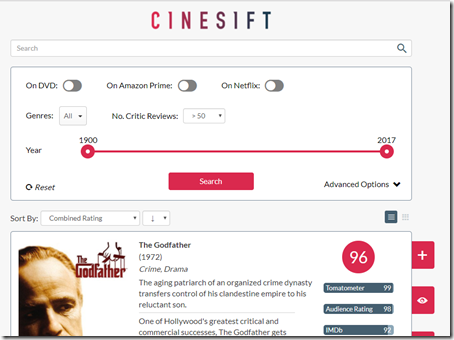
Cinesift: A complete list of movies based on ratings

Several months ago I was wasting my time in reddit as always and a redditor posted a link to a website that he/her created called Cinesift.

Thanks to it I avided Batman v Superman.

Now, this is not like any other website about movies over there, no, the site ranks movies based on a score averaged between IMDB, Metascore, Rotten Tomatoes, Audience rating, and Letterboxd. Meaning that you add all of these scores to get the average, basic math.

The site is great, not only because it gives you a list of actually good movies to watch, but also becuse since these scores are a combination between critics and regular people, you can see both sides of the story.

But anyways, go check it out, it won’t disappoint.


Saturday, October 8, 2016

YSK That Google has a Color to Hex converter

If you’re a web designer, graphic designer, or a designer of any kind, changing from color to their hexadecimal counterparts is something part of the job... is like breathing. So, Google is making things way to easy allowing you to search colors and find their Hex code.

RGB to Hex

Although, as anything, this has some rules and limitations. For example, you can’t search “red to hex” or “color to hex”, this won’t work. But you can do “rgb to hex” or “#f00000”, this will work.

But no matter that, try it out and see how it is. I know that it will save a lot of time to a ton of users.

Tuesday, August 30, 2016

How to get the global site on Facebook Pages

I did something similar a while back, but I just realized that that method is obsolete. So here’s the new way to do it.

Go to the page (in this case will be SteelSeries), hover on More, then click on Switch Region.

Weird thing is, I'm not from Spain.

Now select the region you like, I recommend default since it’s the main site, but choose the one you want.

Easier than before.

And that’s it, no more redirection crap... I hope.

Sunday, July 10, 2016

Reddit is now tracking your clicks. Here’s how to disable it

In a recent update, reddit decided to implement a tracking system to monitor users’ clicking under the feature “Allow reddit to lot my outbound clicks for personalization”. This is most users hate, and that’s why we use adblockers, the ads are tolerable, but tracking is not. Anyhow, here’s the easy way to disable it.

Go into your Preferences, scroll to the bottom.

Money.

Just disable that one and you should be done.

Sunday, July 3, 2016

How to permanently hide Facebook Right Sidebar using Adblock Plus

I really hate this shit.

Saw that? I hate that. I don’t care about anything in that sidebar, so I decided to hide it. Here’s how to do it. First you need to install an ad blocker, in my case Adblock Plus. I’m not saying it’s the best, just the one I’m most familiar with at the moment.

Saturday, July 2, 2016

YSK how to check your Google Location history

Something I just learned. If you go into your Google account you can see your location history, which are the places where you log into your Google account, this includes PCs and mobile devices.

I can see my house from here.

You could disable this, but by doing this, according to Google, Maps and Now may be not work correctly. And don’t worry, the alerts that say that you’re account is being accessed from X location will still be enabled and working without problem.

Just remember something important, there is still a chance that Google keeps recording your location whether you disable this or not, so the best thing you can do is disable any location services on your PC and your mobile.

YSK about YouTube “Continue Watching” section

Just a little tip for those who use YouTube on PC: if you stop watching a video at any point, there is a chance that the video will be added to a section called Continue Watching.

This is new to me.

What’s so special about this? Well, apparently it will play the video where you left off, which is amazing if you like watching really long videos (my case) and have a really bad memory (also my case).

Anyway, just remember that the section in there in case you need it.

Friday, July 1, 2016

YSK you can use Shift in Google Maps

Google Maps and Google Earth are slowly merging... or at least sharing feature. This is one that I recently discover thanks to reddit, and is that if you hold Shift while moving the mouse, the whole map becomes 3D, just like Sim City or Cities Skylines.

Use better on first world countries.

Although if a very useless trick, it’s still amazing, and shows how amazing the technology is these days. We live in the future already.

Saturday, August 16, 2014

FUCKING HOMEPAGE: A FUCKING HOMEPAGE

Fucking Homepage

In case the title misleads you, this site is called FUCKING HOMEPAGE, and it’s a site that updates daily with useful information, cool websites, life tips, awesome books, interesting people, and more.

TIP OF THE FUCKING DAY: 

A MISTAKE MADE ONCE IS JUST A LESSON.

Unlike may other sites that try to ease you into reading stuff, this site just puts the info out and shove it into your face as soon as you place your eyes on it. But seriously, it’s a pretty awesome source for cool information; books, tips, people, did-you-knows, websites, images...

FUCKING MIND-BLOWING BOOK OF THE DAY:

FULFILL YOUR DAMN POTENTIAL.

The site is completely fill with all kinds of useful shit, from the beginning to the end. And I really recommend you to read all you can from it, it’s the best fucking homepage you’ll ever have.

Saturday, August 9, 2014

Disable Facebook Video’s Autoplay

A few days ago Facebook introduced another useless feature that nobody asked nor like: Videos now autoplay as soon as you see them. Yes, they are muted, but this is still a useless piece of shit feature that is completely worthless and I hate with all my non-existent heart. So, let’s disable it, shall we?

As always, first go to Settings.

Facebook

You should see that there is a new option on the left named Videos. You can click it if you want to.

Facebook

And finally, switch from On to Off.

Facebook

And that’s it, the changes are effective immediately. You just have read the small letters:

Note: This setting only applies when you use Facebook on your computer. Go to your phone's settings to change auto-play videos in your Facebook app.

So you need to disable this on you phone to work there.

Friday, August 8, 2014

YouTube now supporting 4k videos

YouTube is slowly introducing 4k video support to the site, although is not yet supported by all channels, and even if you set the quality to 4k, is still possible that the video has no “4k version” and it will automatically change to 1440p.

YouTube 4k

In other cases, for any reason at all, you won’t be able to play the 4k version and will be lowered automatically. But even knowing that, you still can download the video old-school style and watch it on you PC if you want.

jDownloader

Wednesday, July 9, 2014

How to delete your Google+ account

Social networks are more and more dangerous every day, and I’m not talking about addiction or actual physical danger, but privacy intrusion. These networks ask more out of you each time they can, there are even some apps that ask for your bank information so you can transfer money from, let’s say, Facebook. Or vice versa, banks that let you connect to your social network... Doesn’t seem legit at all.

Anyway, not related to that, here’s how to delete your Google+ account. First click on your picture on the top right, then Account.

Google Account

Then click on Edit settings.

Google Settings

Then scroll all the way down and click on “here”.

Delete account

Now, here’s what you lose:

From Google+:

  • Your circles will be deleted, but people in your circles will remain in your Contacts.

  • Your +1's will be deleted.

  • Your posts and comments will be deleted and won't available to the people or communities you shared them with.

  • Any profile information that you did not make public will be deleted.

  • Many Google+ social and sharing features will be disabled for you on other Google sites.

  • Content from other services, such as videos, will no longer be visible to people in those circles.

  • No photos will be deleted: you can still access them in Picasa. To delete them, go to Picasa Web Albums.

  • Your connections to third-party services will not be affected. To manage them go to Connected accounts settings.

  • Your chat buddies in Google Talk and Gmail will not be deleted.

  • Your Google+ Local reviews will not be deleted: They will be marked as private and accessible in the "My Places" section of Google Maps. You will be able to delete them there. Learn more.

  • No communities you created will be deleted, unless you're the only member.

Google+ Pages:

  • Pages you own
    No Google+ pages that you own will be deleted. If you don't want to own a page any more, you can delete it. Deleting a page is permanent. You can also transfer ownership of a page, using the page's settings. Learn More.

  • Pages you manage
    You can continue to manage any pages you currently manage. Your name and email address will be visible to the owner and the other managers of any page you manage. You can also remove yourself as a manager of a page, using the page's settings. If you do, you'll no longer be able to act as that page or take any kind of administrative actions. However, all of your past posts, comments, and other actions will remain intact. Learn More.

YouTube

Deleting your Google+ profile will affect your channel [Google+ Name] Learn more

If you delete your Google+ profile:

  • Your comments and messages will be permanently deleted

  • The following will be made private until you re-enable your channel:

    • Your channel name

    • Other people's subscriptions to your channel

Your public Google profile will be removed.

  • Deleting your public profile will not affect the status of your Google Account.

Delete G+ account.

Check both squares and click on Remove selected services.

Delete g+ account.

Enjoy.

Tuesday, June 24, 2014

Disabel SourceForge Downloader

SourceForge

If you’ve used SourceForge lately, you may have noticed how all programs are now being installed using a downloader that, as all downloaders, is full of adwares. The good part is that SourceForge at least allows you to disable this.

SourceForge

And that’s it. Just remember to disable it if you’re not in your PC or if you delete your cookies.

Monday, June 23, 2014

YouTube is now adjusting the videos to the size of your screen

A small adjustment that went unnoticed, if you click the Theater mode to make the video bigger, YouTube will automatically resize it to fit a bigger part of your screen.

YouTube

Although this is a really small change, it’s very useful and quite necessary. Also, if you have a fast Internet connection, you probably won’t notice it, but a lot of use do notice it, and because of that, thanks, YouTube.

Monday, June 16, 2014

YSK How to see your reddit list of Friends

reddit is an awesome place, and mostly is very user friendly, except for searches and friend-customization actions. Not that the latter is necessary, but in case you want to clean your /r/friends, just go to https://ssl.reddit.com/prefs/friends.

reddit friends

Monday, June 9, 2014

Create corrupted text using Zalgo

One of the most common and useless things on the Internet is corrupted texts, everyone hate them, including me, but then again, curiosity killed the cat.

Corrupted Text

One easy tool to use is Zalgo Text Generator, just copy and paste the text that appears in the text box you want to use it. But keep in mind that Facebook limits the size of the text, and it won’t appear complete.

Corrupted text

YSK how to make Facebook show Most Recent stories instead of top stories

Yeah, long title, but it’s a short post to compensate. Well, although Facebook is now remembering your sorting choice, sometimes it changes and many people can’t find a way to get Most Recent again.

The most common way is this one... Actually, is kinda the only one.

Facebook

Although, if you want a better and inmediate way, you can just bookmark this link:

https://www.facebook.com/?sk=h_chr

Facebook

Tuesday, June 3, 2014

YSK how to use the old Google Maps

In case your PC can use the new Google Maps at full speed, there is a simple way to use the old one again.

Just use this link:

https://www.google.com/maps?output=classic

Google Maps